
Al Developer Lab: Exploring HyperDev for Al App Development
Last Updated • 18 October 2026
Al app builders promise to turn simple instructions into working applications without requiring developers to build everything from scratch. But how well do they perform when you test them on a real project?
For this edition of Al Developer Lab by Coding Professors, I tested
HyperDev
by building a freelance project-management dashboard from a text prompt. I explored its planning and building workflow, project management features, code editor, responsive preview, and publishing options to see what it could actually deliver.
Here's what worked, what could be improved, and whether
HyperDev
is worth exploring for Al-powered app development.
What Is HyperDev?
HyperDev
is an Al-powered app-building platform designed to help users turn ideas into web applications. Instead of manually creating every component, you describe the application you want and use the platform's Al-assisted workflow to plan, generate, and refine it.
It may be useful for developers, founders, and vibe coders who want to prototype an idea, test a user interface, or accelerate the early stages of development.
What I Built with HyperDev
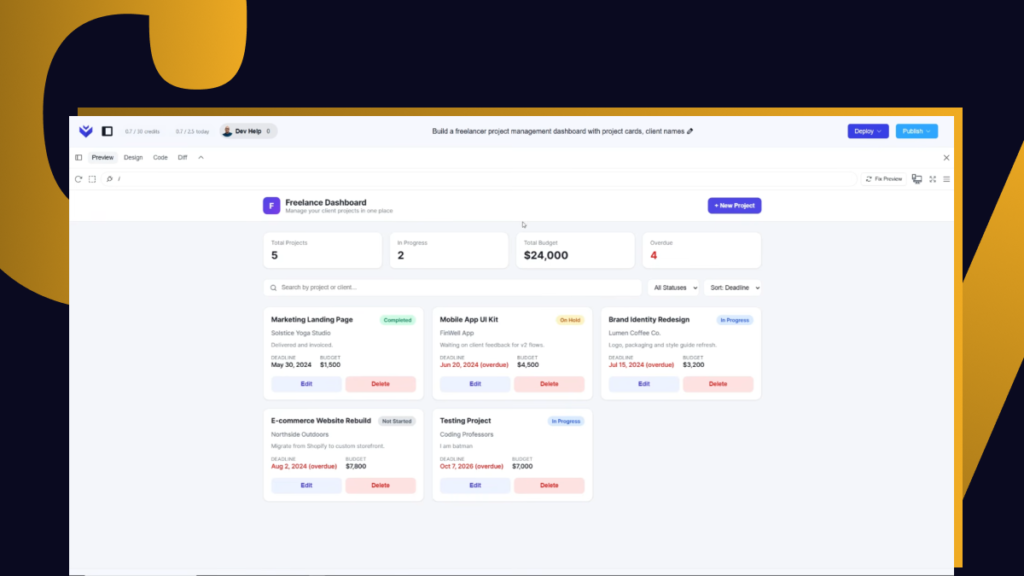
For my test, I chose a freelance project-management dashboard. The idea was to create an interface where users could manage projects and organize their work.
I started by describing the application and its requirements in a prompt.
HyperDev
guided the project through its planning, design, and build stages.
This workflow made it possible to move from an idea to a generated application without manually writing the entire project from the beginning.
The goal was not just to generate a visually appealing page. I also wanted to explore how well the platform handled project management features, editing, and publishing.
Testing HyperDev's Features
1. Prompt-Based App Generation
I used a text prompt to describe the dashboard and its intended functionality.
HyperDev
generated the initial application through its plan, design, and build workflow.
This approach can help reduce the time required to establish an initial project structure. However, generation was slower than I expected, so the experience was not always immediate.
2. Project Management Features
The generated dashboard included project management functionality, allowing me to test creating, viewing, updating, and deleting projects.
I also tried adding a new feature: priority badges. This gave me an opportunity to see how
HyperDev
handled changes after the initial application had been generated.
The ability to request additional functionality through Al is useful during prototyping. However, generating a feature does not automatically prove that every part of an application is production-ready.
3. Preview, Design, and Code Editing
HyperDev
provided options to preview the application and explore its design and code.
Access to the code is valuable because developers can inspect the generated implementation rather than treating the result as a completely closed system. It also creates an opportunity to refine the application beyond the initial prompt.
During testing, editing could become locked while the Al was generating changes. I also encountered a refresh-related issue, which interrupted the workflow.
These issues did not make the platform unusable, but they affected the overall smoothness of the experience.
4. Responsive Design
I explored the responsive preview to see how the dashboard adapted to different screen sizes.
The platform provided a way to inspect the application across device layouts, but the responsive result was not perfect. Some adjustments were still needed, so developers should test layouts carefully rather than assuming that Al-generated interfaces will work flawlessly on every device.
5. Publishing the Application
HyperDev
also provided a publishing workflow, allowing me to explore how the generated project could be made accessible through a
HyperDev
URL.
This is useful for sharing a prototype or demonstrating an early-stage product. Custom-domain availability and project-related restrictions depend on the plan, so users should check the current plan details before choosing HyperDev for a public or commercial launch.
HyperDev Free Plan: What to Know
I tested
HyperDev
using the free plan and had approximately 2.5 credits available during the test.
The free experience also had restrictions related to remixing and public projects. These limitations matter if you want to experiment with existing projects, collaborate, or keep a project private.
Plan limits and features can change, so confirm the current terms directly on
HyperDev
before relying on a specific allowance or publishing option.
Pros and Limitations
What I liked
- Turns a written prompt into an initial web application.
- Supports an iterative workflow for adding features.
- Includes project management functionality in the generated dashboard.
- Provides preview, design, and code access.
- Offers a publishing workflow for sharing a project.
What could be better
- App generation can take longer than expected.
- Editing may be unavailable while generation is in progress.
- A refresh-related issue interrupted my test.
- Responsive layouts may require manual refinement.
- Free-plan restrictions limit some project and remixing options.
Final Verdict: Is HyperDev Worth Trying?
My
HyperDev
test showed that the platform can be useful for turning an application idea into an editable prototype. I was able to generate a freelance project-management dashboard, explore its project features, request a priority-badge addition, inspect the code, and try the publishing workflow.
However, the slower generation process, refresh issue, imperfect responsiveness, and free-plan restrictions are important considerations. The test also does not establish that the generated application is ready for production without further development and testing.
My verdict:
HyperDev
is worth exploring if you want to prototype web applications quickly with Al assistance. It may help developers and founders get started, but you should still review the code, test functionality, improve responsiveness, and evaluate the plan limits before using it for a real product.
Watch the
HyperDev
test to see the development process and results in action.
Explore more: Follow Al Developer Lab by Coding Professors for practical tests and reviews of Al tools for websites, web applications, and digital products.

About the Author
Abdul Rehman — Co-Founder & Technical Director, Coding Professors
Abdul Rehman is a web designer and engineer with 3+ years of experience in high-end web design and development. As Co-Founder of Coding Professors, he focuses on making technology careers more accessible through practical guidance, mentorship, and industry-focused resources.