
Atoms AI Review: I Built an Interactive Website from One Creative Prompt
Last Updated • 6 November 2026
What happens when you ask an AI website builder to create a website where every click reveals something unexpected?
For this experiment, I gave Atoms a creative concept called “The Impossible Internet” and asked it to turn the idea into an interactive website. The result included a galaxy-inspired visual design, engaging animations, and an unusual interactive experience.
In this edition of Al Developer Lab by Coding Professors, I explored
Atoms'
website-building workflow, code generation, preview, cloud features, and publishing options. Here's what happened during the test and whether Atoms is worth exploring.
What Is Atoms?
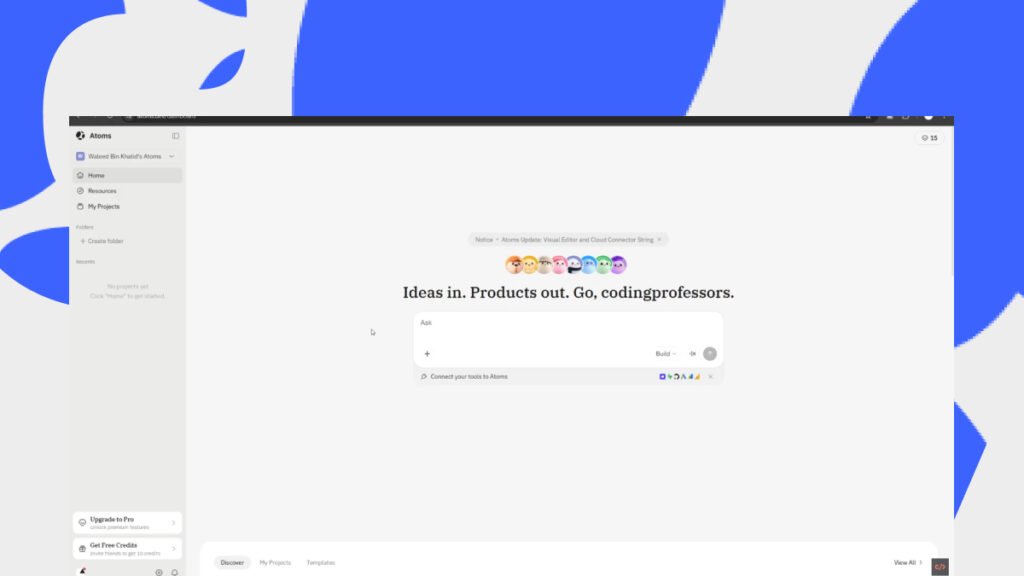
Atoms is an AI-powered development platform that helps users create websites and applications through natural-language instructions.
The platform provides templates, a prompt-based building interface, code access, and an app preview. It also offers additional development resources, cloud functionality, connectors, and marketing-related options.
One interesting feature is its support for audio input, giving users another way to provide instructions instead of relying entirely on written prompts.
For this experiment, I wanted to see how well Atoms could interpret a creative brief and turn it into an engaging website.
The Experiment: The Impossible Internet
Instead of creating another standard business landing page, I prepared a more unusual concept called The Impossible Internet — where every click reveals something unexpected.
The prompt included the website's identity, tone, hero section, and other homepage sections. The objective was to see whether Atoms could translate a creative idea into a distinctive visual experience.
I submitted the prompt through the chat interface and started the build.
During generation, Atoms displayed its working logs and code. The live preview was not immediately visible, so users initially had to watch the generation process through the code view.
Once generation was complete, the app preview became available.
What I Tested in Atoms
1. Prompt-Based Website Generation
I used a detailed English prompt to describe the concept, branding, visual direction, and interactive experience.
Atoms processed the instructions and generated the project structure. It also organized the project files, including documentation and a public folder.
The initial interface showed the code and working logs rather than immediately presenting a visual preview.
This approach may be useful for developers who want to inspect the implementation while the AI works. However, it may feel less intuitive for non-technical users or founders who simply want to see the website being created.
A visual preview available from the beginning would make the experience more approachable.
2. UI/UX Design and Visual Experience
This was the strongest part of my test.
Atoms understood the creative direction and generated a website with a galaxy-inspired background, distinctive sections, and a visual style that matched the concept.
The overall design felt much more interesting than a typical template-based landing page.
It also handled the requested tone well. Rather than producing a generic website, it translated the unusual concept into a cohesive visual experience.
3. Interactive Features and Animations
The most impressive part was the interactive experience.
One of the generated elements was a Surprise Me button. Every time I clicked it, the website revealed a new unexpected experience in a new window.
This was exactly the kind of behavior the original prompt requested.
The animations and visual elements also worked well during the preview. Atoms demonstrated that it could interpret more than basic layout instructions and create an experience with a distinctive interaction concept.
For creative websites, portfolios, and experimental landing pages, this capability makes the platform particularly interesting.
4. Code Structure and Developer Workflow
Atoms provided access to the generated code and organized project files.
This is useful for developers who want to inspect the implementation rather than work exclusively through a visual editor.
The platform also provided an overview of the generation process, showing what it worked on and how the project was structured.
During my exploration, the generated project appeared lightweight, and the code-focused workflow offered more visibility into the development process.
5. Cloud, Connectors, and Additional Features
Atoms also offered its own cloud functionality, along with connectors and marketing-related tools.
These features could be useful when moving beyond a visual prototype toward a more complete project.
I explored the available options, but this experiment primarily focused on website UI/UX and interactions. I did not independently validate every cloud, connector, or backend capability.
Developers interested in using Atoms for more advanced applications should test those features separately.
6. Templates, Audio Input, and Publishing
Atoms provided a template section where users could explore existing project designs and choose a starting point.
I also noticed an audio-input option, which could make prompt-based development more flexible.
Another feature was the ability to publish a project. However, publishing required upgrading the plan during my test.
The platform also offered an option to share projects and collect feedback, which could be useful when presenting a prototype to clients or team members.
Atoms Free Plan: What to Know
I tested Atoms using its free plan.
During the experiment, the displayed allowances included:
- 15 daily credits.
- Up to 25 monthly reusable credits.
- 2 GB of disk space.
These were the allowances shown during my test, not a guarantee of the platform's current pricing or limits. Check Atoms' official website for the latest plan details before subscribing.
Pros and Limitations
What I liked
- Strong understanding of detailed creative prompts.
- Impressive UI/UX design and visual presentation.
- Generated a distinctive galaxy-inspired website.
- Created engaging interactive elements.
- The Surprise Me button delivered the requested unexpected experience.
- Organized project files and provided code access.
- Audio input option for prompts.
- Templates for different project types.
- Cloud, connector, and marketing features.
- Project sharing and feedback options.
What could be better
- The preview was not displayed immediately during generation.
- The initial code-focused screen may confuse non-technical users.
- Publishing required a paid-plan upgrade during my test.
- More testing is needed to verify advanced backend and cloud functionality.
Final Verdict: Is Atoms Worth Trying?
Atoms delivered a strong result in this experiment. It understood an unusual creative concept and transformed it into a visually engaging website with animations and interactive elements.
The most impressive part was how it handled the original idea: every click should reveal something unexpected. The generated Surprise Me interaction demonstrated that the platform could translate a creative instruction into a meaningful website experience.
I also liked the organized code structure, templates, audio input, and additional development features.
The main drawback was the initial code-focused interface without an immediate visual preview. Publishing also required a paid plan in my test.
My verdict: Atoms is worth exploring if you're a developer, designer, or founder who wants to turn creative ideas into interactive website experiences. It is particularly interesting for projects where visual presentation and user interaction matter.
However, this experiment focused on the generated website and its visible interactions. Advanced backend, cloud, and integration functionality still needs separate testing before considering Atoms for a production application.
Want to see the result? Watch the full experiment to explore how Atoms transformed one creative prompt into The Impossible Internet.
Explore more AI tools with AI Developer Lab by Coding Professors.

About the Author
Abdul Rehman — Co-Founder & Technical Director, Coding Professors
Abdul Rehman is a web designer and engineer with 3+ years of experience in high-end web design and development. As Co-Founder of Coding Professors, he focuses on making technology careers more accessible through practical guidance, mentorship, and industry-focused resources.