
Readdy Al Review: I Built a Car Parts Website with Al
Last Updated • 28 October 2026
Can an Al website builder create a good-looking website from a single prompt? And is the result useful enough to start a real online business?
In this edition of Al Developer Lab by Coding Professors, I tested
Readdy AI
by creating a website concept for an e-commerce store that sells car parts. The prompt included the website theme, functionality, and animations, allowing us to evaluate how quickly the tool could turn a detailed idea into a visual website.
We also explored the editor, available integrations, free-plan limitations, and mobile responsiveness.
What Is Readdy AI?
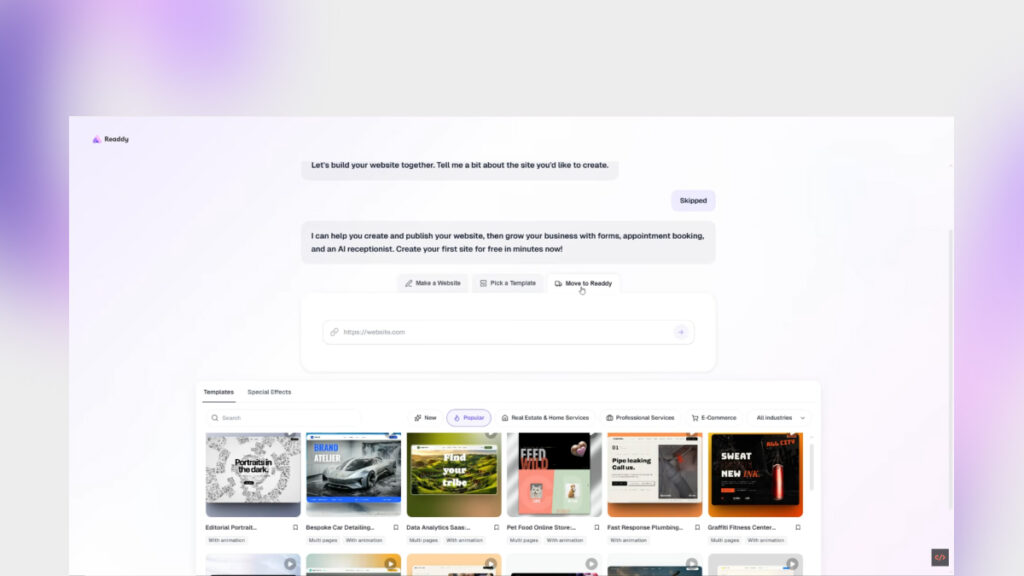
Readdy Al is an Al-powered website-building tool that helps users create website designs from prompts. During our exploration, the platform offered three starting options: generate a website using a prompt, choose a template, or bring an existing website into its workflow.
For this test, we chose prompt-based generation to see how effectively it could transform a written brief into a website.
Creating a Car Parts Website with Al
We prepared a detailed prompt for an online store selling car parts. It specified the design theme, intended functionality, and animations so the AI had a clear direction.
The interface was clean and straightforward. It also offered options to target web or mobile experiences, use voice input instead of typing a prompt, and attach documents.
After submitting the prompt, Readdy presented a guided workspace with instructions for navigating the editor. Once the initial setup was complete, we let the AI generate the website.
The generation process felt quick, making it useful for exploring an idea without spending a long time building the initial design manually.
Website Design and Features
The generated result was a single-page website with a hero section featuring an overlay background image, prominent buttons, written content, and a form.
Visually, the layout was appealing and provided a reasonable starting point for a car-parts business. The page also included interactive elements that we could inspect in the preview.
However, the content was fairly generic. For example, the messaging focused on buying with confidence rather than presenting detailed product information or a distinctive selling proposition for a car-parts store.
This is an important distinction: the AI generated a website concept, but our test did not establish that it had built a complete e-commerce system with working product listings, shopping cart, checkout, payments, and inventory management.
If you are planning to use Readdy for an online store, those functions need to be built and tested separately.
Testing Mobile Responsiveness
Next, we switched to the iPhone 16 preview to examine how the design adapted to a smaller screen.
The website fitted the mobile viewport well, and the navigation appeared to work as expected during our basic test. The layout remained usable without obvious screen-fitting problems.
This was one of the more encouraging results. Mobile responsiveness is essential for modern websites, especially online stores where customers may browse products from their phones.
However, this was a quick visual and interaction check rather than comprehensive testing across different devices and screen sizes.
Editor, Integrations, and Additional Tools
Readdy's workspace included several options for continuing the project after generation.
During the exploration, we found options related to domain configuration, SEO, analytics, connectors, and agents or skills. The interface also offered the ability to export to Figma.
These options could help users connect website creation with their broader design and business workflow. Their actual usefulness will depend on the project requirements and the integrations a user needs.
The editor also displayed a credit balance, making it possible to see that AI usage was subject to limits.
What Does the Free Plan Include?
We tested Readdy using its free plan, which allowed us to generate and preview the website concept. However, the free tier had important restrictions in the workflow we explored:
- Custom domain: Connecting a custom domain required a plan upgrade.
- Code access: Viewing and editing the generated code were not available on the free plan during our test.
- AI credits: Generation and further editing used a limited credit allowance.
These limitations matter if you are a developer who wants direct control over the generated code or a business owner who plans to publish a branded website.
Check Readdy's current pricing and plan details before committing, as features and limits may change.
Readdy AI: Pros and Limitations
What worked well
- Clean and beginner-friendly interface.
- Quick generation of an initial website concept.
- Attractive single-page layout with a hero section and form.
- Mobile preview that performed well in our basic iPhone 16 test.
- Additional workflow options, including SEO settings, integrations, and Figma export.
What needs consideration
- The generated website used generic content.
- The test did not verify a complete e-commerce shopping and checkout flow.
- Custom domain support required an upgrade in the tested workflow.
- Code viewing and editing were restricted on the free plan.
- Credit limits may affect continued generation and refinement.
Final Verdict: Is Readdy AI Worth Trying?
Readdy AI is worth exploring if you want to generate a simple website quickly, especially when you need a visual starting point and do not already have all the content prepared.
In our test, it created an appealing single-page car-parts website and adapted well to the iPhone 16 preview. The straightforward interface also made it easy to move from a prompt to a visual result.
However, the result was a starting point rather than a finished online store. The generic content, free-plan restrictions, and unverified e-commerce functionality should all be considered before using it for a real business.
My verdict: Consider Readdy AI for simple websites, early concepts, and rapid design exploration. If your goal is a fully functional e-commerce store or direct control over the code, verify the required features and plan limitations before choosing it.
Watch the full test: Watch the Readdy AI car parts website test
AI Developer Lab by Coding Professors explores AI tools through practical tests, product reviews, and website and app-building experiments for developers, founders, and vibe coders.

About the Author
Abdul Rehman — Co-Founder & Technical Director, Coding Professors
Abdul Rehman is a web designer and engineer with 3+ years of experience in high-end web design and development. As Co-Founder of Coding Professors, he focuses on making technology careers more accessible through practical guidance, mentorship, and industry-focused resources.