
Netlify AI Review: I Built and Deployed a Working Website with One Prompt
Last Updated • 12 November 2026
Building a website with AI is one thing. Getting that website built, hosted, and live is another. In this episode of Al Developer Lab by Coding Professors, I tested
Netlify’s AI
agent to see whether it could handle both design and development from a single prompt.
The challenge was to create a modern online tools website with a premium design system, multiple sections, and functional features. I tested it using Netlify’s free version and a straightforward English prompt.
Getting Started with Netlify AI
Netlify provides a platform for building and deploying web applications. During the test, its AI builder offered a simple starting interface with an AI agent.
After signing in, I found an initial allocation of 400 credits displayed in the account. The interface also provided several ways to start a project:
- Write a prompt or use a prompt template.
- Dictate instructions using voice.
- Attach images or files.
- Import an existing Git repository.
- Choose an AI agent or model.
I selected the default agent, entered my website prompt, and started the build.
The interface displayed the agent's activity and credit usage while it worked. This made it possible to follow the generation process rather than simply waiting for a finished result.
The AI Built and Deployed the Website
Once the process finished, Netlify reported that the project was ready and the site was live. It also provided a preview link hosted on a Netlify app domain.
The displayed usage was 457 credits for the build. That is worth considering when evaluating the free experience: the initial account allocation shown during my test was 400 credits, while the completed project displayed higher usage.
I opened the preview and inspected the generated website, including its code and project files.
Website Design and Features
The visual result was one of the strongest parts of this experiment.
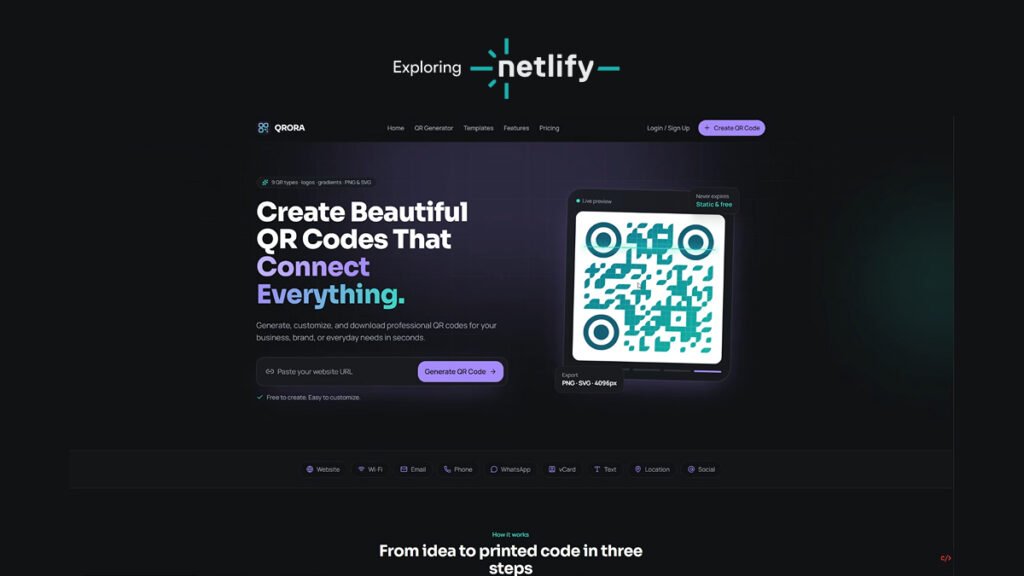
Netlify generated a complete website identity, including a logo, navigation, color palette, icons, and consistent styling across the different sections. The design looked polished and had a clear visual direction.
One of my favorite details was the animated QR code generator. I entered my own website URL to test it, and the feature worked during the demonstration.
The website also included:
- A collection of online tools.
- A template library with different options.
- A color palette section with downloadable PNG and SVG formats.
- Feature descriptions and use cases.
- Pricing information.
- A final call-to-action section.
The palette section allowed me to select colors and download them in different formats. The generated interface also maintained a consistent icon style, using line-based icons throughout the design.
Overall, the website looked much closer to a finished product than a basic AI-generated mockup.
Responsive Preview and Code Access
Netlify provided a preview of the website alongside access to the generated code and project files.
I also checked the responsive layout. The preview appeared to adapt to different screen sizes, which is an important part of building a usable website.
Having access to the code and project structure is useful for developers who want to inspect what the AI has generated rather than relying only on a visual preview.
Can You Export and Host the Project Elsewhere?
I also looked for an option to export the project and host it on another platform.
During my test, I could not find a straightforward option to export the complete AI-generated project for deployment elsewhere. Netlify provided its own project, deployment, data, and storage controls, along with the option to connect a custom domain through the platform.
This makes Netlify particularly convenient if you want to build and deploy within its ecosystem. However, developers who require a clear external hosting or migration workflow should investigate that requirement before committing to the platform.
Netlify AI Pricing and Credits
The account displayed 400 credits when I started the experiment. The completed build showed usage of 457 credits, and the platform also presented upgrade options.
Netlify's free experience is therefore worth exploring, but credit consumption matters. A large project can use a significant amount of the available allowance.
Pricing and credit limits can change, so check the platform's current pricing page before planning a larger project.
Final Verdict: Is Netlify AI Worth Trying?
My verdict: 10/10 for this experiment.
Netlify impressed me because it handled both the website creation and deployment process. The generated design was polished, the sections were consistent, and I was able to test working features such as the QR code generator and downloadable color palettes.
The biggest advantage is the build-and-deploy workflow: you can move from a written idea to a live website without managing a separate hosting setup during the experiment.
The main consideration is platform flexibility. I couldn't find a straightforward way to export the project for hosting elsewhere, and credit usage should be considered when building larger applications.
If you want to experiment with AI-powered website development and deploy your project through Netlify, this is a tool I would recommend trying.
Tested by Coding Professors — AI Developer Lab.

About the Author
Abdul Rehman — Co-Founder & Technical Director, Coding Professors
Abdul Rehman is a web designer and engineer with 3+ years of experience in high-end web design and development. As Co-Founder of Coding Professors, he focuses on making technology careers more accessible through practical guidance, mentorship, and industry-focused resources.