
Webflow AI Review: I Built a 5-Page Interior Design Website in 30 Seconds!
Last Updated • 21 November 2026
Can AI turn a simple English prompt into a professional, multi-page website in seconds? In this episode of Al Developer Lab by Coding Professors, I tested
Webflow AI
to find out.
For this experiment, I created a detailed prompt for a modern interior design business. It included the visual identity, design direction, website sections, navigation, and interactive elements.
The goal was to see whether Webflow could transform those instructions into a polished website that would be suitable for a real business.
Getting Started with Webflow AI
Webflow offers multiple ways to create a website. You can start with an existing Webflow project, explore its template library, or create a custom website using its visual development environment.
For this experiment, I selected the AI website builder.
I prepared a prompt describing the interior design brand, its visual identity, page structure, and desired user experience. After adjusting the prompt to fit the input limit, I submitted it and started the generation process.
The interface was straightforward. Webflow first generated a website structure that I could review before continuing to the complete design.
Webflow AI Generated a Five-Page Website
The generation was surprisingly fast. It took approximately 30 seconds to create the initial website structure and design.
The result included five pages:
- Home
- Collections
- Product
- Shop
- Shop by Room
This was a strong starting point for an interior design business because the website had a clear structure for showcasing products, collections, and different shopping categories.
After generation, Webflow provided options to review the website, explore its sections, adjust themes, and request changes.
Website Design and User Experience
The visual quality was one of the strongest parts of this experiment.
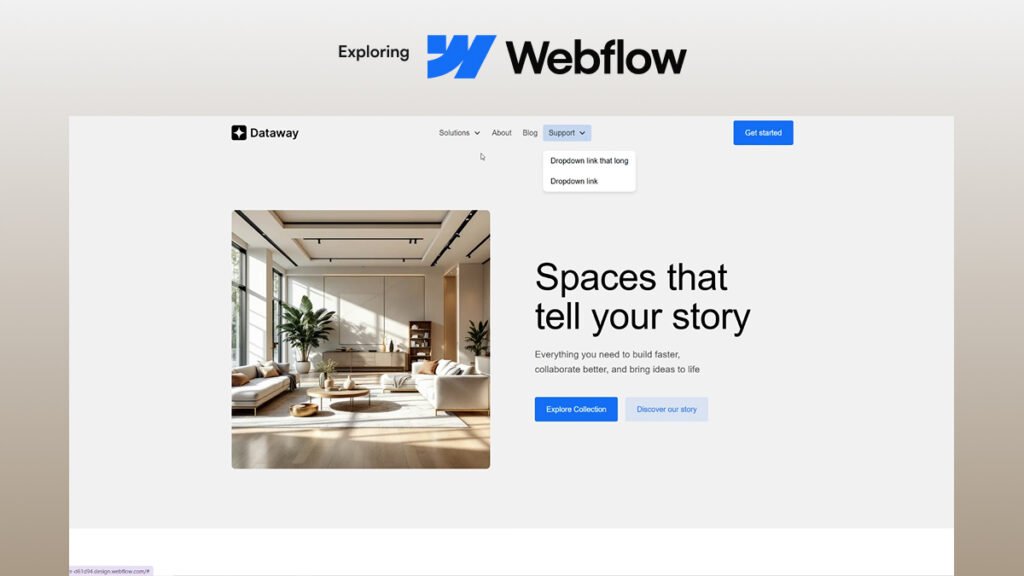
Webflow followed the requested design direction and created a minimal, professional interior design website. The use of white space, typography, and section spacing made the overall experience feel clean and well organized.
Here are some of the details that stood out:
Consistent design system: The website maintained a cohesive visual identity across its pages.
Hero section: The heading, supporting text, imagery, and buttons were arranged in a polished layout.
Navigation: The navigation included submenu interactions that could be explored in the preview.
Hover and click interactions: I tested different buttons and hover effects to see how the interface behaved.
Product presentation: The collection and shopping sections provided a suitable structure for an interior design brand.
Rather than producing a collection of generic text blocks, Webflow generated a website with a clear visual direction and consistent layout.
Mobile Responsiveness
A professional website also needs to work well on smaller screens.
Webflow provided a mobile preview, allowing me to inspect how the generated website adapted to a mobile layout.
The mobile version looked well structured. I also explored its form, footer, and other visible sections.
This was a positive result because the generated website maintained its visual direction across the desktop and mobile previews.
Editing, Collaboration, and Development Features
After reviewing the website, I explored the Webflow editor and additional development options.
The platform provided several useful capabilities:
- Real-time website editing.
- Theme and section customization.
- Collaboration through teammate invitations.
- Code-related development options.
- Converting website content into CMS collections.
- SEO and marketing tools.
- Website insights and project management features.
The editor allowed me to make changes directly rather than relying entirely on the AI generation process.
Webflow also offers a marketplace where users can explore additional assets, plugins, templates, and other resources.
Webflow Hosting and Pricing
Webflow provides an ecosystem covering website design, hosting, publishing, and content management.
During my exploration, I reviewed its Starter, Basic, CMS, Premium, and other plan options. Publishing the generated website required upgrading from the free experience.
The Premium plan displayed features such as CMS capabilities, 50 GB bandwidth, reusable components, and site search during my recording.
Webflow also offers team-oriented plans for agencies and development teams.
Pricing and plan features can change, so check the official Webflow pricing page before choosing a subscription.
Final Verdict: Is Webflow AI Worth Trying?
My verdict: 9.5/10 — Highly recommended.
Webflow AI delivered an impressive result in this experiment. It generated a five-page interior design website in approximately 30 seconds, followed the requested design system, and provided a clean, professional user experience.
The mobile preview, interactive elements, real-time editor, CMS capabilities, collaboration options, and hosting ecosystem make it particularly interesting for professional website projects.
I would recommend exploring Webflow if you are a freelancer, agency, business owner, or developer looking for a platform that combines visual website development with AI-assisted generation.
The generated website still deserves a detailed review and customization before launching a real business. Also, publishing requires an appropriate paid plan.
Overall, Webflow is one of the strongest website-building platforms explored in this AI Developer Lab experiment.
Tested by Coding Professors — AI Developer Lab.

About the Author
Abdul Rehman — Co-Founder & Technical Director, Coding Professors
Abdul Rehman is a web designer and engineer with 3+ years of experience in high-end web design and development. As Co-Founder of Coding Professors, he focuses on making technology careers more accessible through practical guidance, mentorship, and industry-focused resources.